Where Global Buyers Actually Manage Manufacturing RFQs


A buyer is running sourcing for a mid-size industrial equipment company. Right now there are eight RFQs open across five manufacturing suppliers, for six different parts. Three quotes are sitting in the inbox waiting on a decision. Two suppliers have not replied yet. One RFQ cannot be found at all. It is buried somewhere in a long forwarded email chain. Nobody can say which supplier it went to or what was actually asked for.
This is not a supplier problem. All five suppliers might be capable and fairly priced. The problem is that nobody is managing the RFQs as a set. Each one lives in its own thread, in one person's head, with no shared view of where anything stands.
In practice, a buyer running several RFQs at once is rarely doing it inside one dedicated piece of software built just for this. Most run a structured tracker instead, usually a spreadsheet, built around a short list of fields, a small set of stages and a fixed habit of following up. No single tool replaces that discipline. The fix is a system, not a piece of software. This guide walks through what that system actually looks like.
What changes once you have more than one RFQ open
A manufacturing RFQ or request for quotation, is the document a buyer sends a supplier asking for pricing on a specific requirement. Writing one well is its own skill, covered in our general guide to writing a manufacturing RFQ.
Running six or eight of them at once, across several suppliers, is a different problem. A single RFQ needs a good document. A portfolio of RFQs needs a system that shows you, at a glance, what is still open, what has been quoted, what you are comparing right now and what you have already awarded. Without that system, none of the work actually disappears. It just goes invisible. A quote does not stop existing when it goes quiet. It just stops being something anyone is watching.
Signs your RFQ tracking is the problem, not your suppliers
A few signs point straight at the tracking process rather than the suppliers themselves.
- You cannot say, without checking, how many RFQs you have open right now.
- You have asked a supplier the same question twice, because the first answer lived in an email you can no longer find.
- Two people on your team have quoted the same part to two different suppliers, without either one knowing the other did.
- A quote from three weeks ago is still marked "under review." Nobody remembers why it is stuck there.
- You compare quotes by switching between browser tabs or PDF attachments instead of looking at one sheet.
- A supplier has followed up with you before you followed up with them.
If two or more of these sound familiar, the fix is not another supplier search. It is a tracker.
The fields a real RFQ tracker needs
A tracker does not need to be complicated. It needs the right columns, kept current. Here is what each RFQ, each row, should carry.
| Field | Why it matters |
|---|---|
| Part name or RFQ ID | So one glance tells you what a row is, without opening a drawing |
| Supplier name | The obvious field, but only useful next to the fields below it |
| Drawing or spec revision sent | So nobody quotes or gets awarded against an outdated version |
| Date RFQ sent | The date every follow-up rule below actually runs from |
| Quote due date | What you told the supplier, not a rough guess |
| Date quote received | Shows which quotations are overdue before you have to ask |
| Quoted price and quantity basis | A price with no quantity attached cannot be compared to anything |
| Key assumptions or exclusions | What a quick read reveals is missing, so you find out now, not at delivery |
| Status | Open, Quoted, Comparing or Awarded, covered next |
| Next follow-up date | The most skipped field, the one that keeps an RFQ from going quiet |
| Owner | The one person on your team actually responsible for this row |
The four stages of an open RFQ
Every RFQ in your tracker sits in one of four stages at any given moment. Naming them the same way every time turns a status column into something everyone actually reads the same way.
| Stage | What it means | What you should be doing |
|---|---|---|
| Open | Sent, no quote back yet | Watching the due date, not the supplier |
| Quoted | A quote has arrived | Checking it is complete before comparing it to anything |
| Comparing | Two or more quotes are being weighed against each other | Normalizing the numbers onto the same basis first |
| Awarded | A supplier has been chosen and told | Notifying the suppliers who were not chosen, quickly |
This is a status taxonomy, not a step-by-step process. If you are running one prototype RFQ from a blank page to an award decision, our guide to prototype RFQ management covers that sequence in more depth, drafting, tracking, comparing and awarding one RFQ at a time. The four labels here exist for a different moment, when you are running fifteen RFQs at once instead of one. A single glance at a column needs to tell you exactly where each one stands without reading the thread behind it.
Moving an RFQ from Comparing to Awarded is not always just a supplier decision either. A larger order can need an internal sign-off first, from procurement, engineering or finance. Our guide to the internal qualification process after a quote covers what that approval chain usually looks like once the quotes are already in hand.
Comparing quotes without re-quoting the job
Once two or more quotes land for the same part, the instinct is to rank them by price. That is usually a mistake, because a cheap quote and an expensive quote can both be correct, for two different assumptions about what the supplier thinks it is building.
Before ranking anything, check what each quote actually assumed on quantity, tolerance, material certification and any finishing step a drawing note mentioned that the quote's line items left out. Our guide to comparing CNC machining quotes walks through this normalizing step in field-by-field detail for machined parts. The same mechanic applies outside CNC work too. Somewhere in most quote spreads, a supplier filled in a gap you left open. Find that gap before you compare the number sitting on top of it.
A follow-up cadence that does not annoy suppliers
A tracker only earns its keep if someone actually looks at the follow-up date and acts on it. A simple, fixed cadence works better than checking in constantly.
- If a supplier has not acknowledged the RFQ within two business days, send one short note asking if it arrived.
- If the quote due date passes with nothing back, follow up once. Do not follow up daily. A supplier who is being chased into a rushed number is less useful than one working at a normal pace.
- Once quotes are in, set your own internal decision date and tell the suppliers what it is. A review with no deadline is exactly how a quote goes stale.
- When you award the RFQ, tell the suppliers who did not win. Do it soon.
That last point runs in both directions. Job shops on the other side of this exact relationship describe the same pattern from their seat, quoting well and then hearing nothing at all, in our guide to why RFQ volume plateaus for manufacturing job shops. A supplier who is quoting for you is also holding capacity open for you while they wait. A fast, clear answer, even when the answer is no, is the same courtesy you would want from a buyer who kept you waiting.
When to close an RFQ
Not every RFQ ends in an award and left alone a tracker fills up with rows nobody is actually waiting on anymore. Close an RFQ when the project it was for gets shelved, a supplier declines to quote, the requirement changed enough to need a new RFQ instead of an edit to this one, it was awarded to a different supplier or it got merged into another RFQ for the same part. A row marked Open six months after any of that happened is not information. It is noise sitting on top of the RFQs that are actually still moving.
Closing a row is not the same as deleting it. Past RFQs are the fastest reference you have for what a supplier actually quoted last time, on price and on lead time and for who quoted well on a part like this before. Archive closed RFQs instead of clearing them out, so next quarter's sourcing round starts from real numbers instead of a blank sheet.
What the whole system looks like at a glance
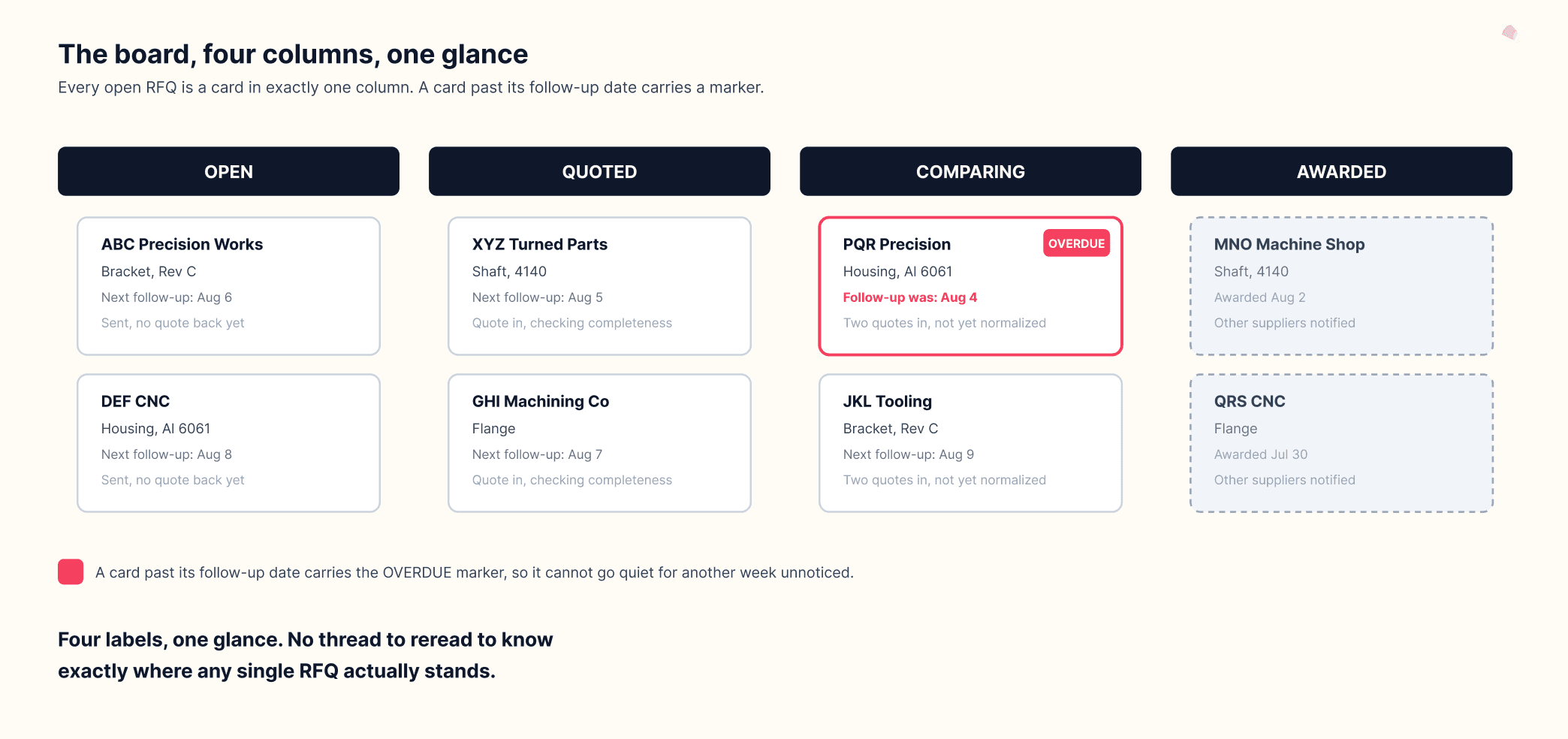
The clearest way to see this system as a whole is a board with four columns, one for each stage, Open, Quoted, Comparing and Awarded. Each RFQ sits as a card in one column, showing the supplier name, the part and the next follow-up date. A card that has sat past its follow-up date without moving carries a small marker, so it stands out before it goes quiet for another week.
The takeaway
None of this needs new software. It needs a decision, before your next round of RFQs goes out, about which fields you will track, what your four stages mean on your own team and who owns the follow-up date. A tracker with real discipline behind it will do more for you than switching where the RFQs themselves live.
Go back to the buyer running eight RFQs across five suppliers for six parts. With this system in place, that same buyer opens one board instead of one long forwarded email chain. Three quotes sit in Comparing with a follow-up date attached to each. Two RFQs sit in Open with their own dates. None of them can go quiet for a week without a marker catching it first. Nothing about the suppliers changed. What changed is that the RFQs are managed as a set.
If you are still writing the RFQ itself, start with the fields that make a supplier take it seriously. Once it is out the door, the system above is what keeps every one of them visible until it is done.
See Also
- Who Bears the Currency Risk When Paying an Indian Supplier
- How to Specify a Precision Component for Indian Manufacturing Suppliers
- Material Test Certificate Verification Guide
- Payment Protection For First Order
- Buyer Reference Check Script for Industrial Suppliers
- How OEM Buyers Manage RFQs When Sourcing Prototypes
Download
Augmino Manufacturing RFQ Tracker
XLSX · 6.7 KB
RFQ tracker with all 11 fields from "The fields a real RFQ tracker needs" built as columns
Frequently asked questions
Where should I manage multiple manufacturing RFQs at once?
Most buyers manage them in a structured tracker built around a fixed set of fields and stages, rather than inside one dedicated piece of software. The fields that matter most are covered in the tracker table above.
Which platform is best for managing manufacturing RFQs?
No single platform replaces a disciplined tracker for a mid-size sourcing operation, because the harder part is the process, not the tool holding it. What that process actually needs is covered stage by stage above.
How do I submit a manufacturing RFQ online?
Most RFQs go out as an email with a structured document attached, sometimes through a supplier portal or a sourcing platform's own form. The channel matters less than whether the document itself has the fields a supplier needs, covered in our general RFQ guide.
What is a manufacturing RFQ?
A manufacturing RFQ, or request for quotation, is the document a buyer sends a supplier asking for pricing on a specific part or requirement. What changes once you are running several of them at once is explained above.
How many manufacturing RFQs can one buyer manage at once?
There is no fixed number. It depends on team size and how disciplined the tracker behind it actually is. A buyer who cannot say how many RFQs are open right now usually has more running than their current system can support, a sign covered in the readiness list above.
What is the difference between an RFQ tracker and the RFQ document itself?
The document is what you send a supplier asking for a price. The tracker is the system that tells you where every document you have already sent actually stands. Both matter. Neither one replaces the other.
How often should I follow up on an open RFQ?
Once if the supplier has not acknowledged it, once again if the due date passes and then again on your own internal decision date once quotes are in. A fixed cadence, not constant checking, is covered above.
How do I know when an RFQ is ready to move from Comparing to Awarded?
Once every quote has been normalized to the same assumptions and, for larger orders, any internal sign-off has been secured. What normalizing actually involves is covered in the comparison section above.
Ready for fewer, better conversations?
Augmino connects verified Indian manufacturers with buyers who mean business.
Apply to Join